
Digital Travel Document Storage in Africa
Travel in Africa often involves remote lodges, multi-country itineraries, long transfers, and regions with unpredictable connectivity. Losing a passport, misplacing a visa, or needing documentation during an emergency can disrupt an entire trip. Digital travel document storage is now one of the most important tools for modern travel across Southern and East Africa. Using digital travel document storage Africa features ensures you always have access to vital ID, even offline.
Storing documents inside a secure travel safety app ensures you always have access to essential ID, even when your inbox, cloud drive, or physical copies are unavailable. Features like offline viewing, encrypted storage, and emergency-ready access have made these systems increasingly popular among travellers searching for the best app for travel safety in Africa.
TravelSafe SOS includes a dedicated digital document vault designed specifically for African travel conditions—allowing users to upload passports, visas, insurance policies, itineraries, and medical information, all accessible even when there is no mobile signal.
Why Travelers Need Digital Backups of Passports and Visas
Lost or stolen passports are among the most common travel incidents. Embassies and border officials often require a digital copy of your passport or visa to verify your identity and issue temporary or emergency replacement documents. With more travellers relying on mobile-first tools, digital backups are now essential for:
• Passport replacement at embassies
• Proof of visa during border checks
• Access to digital eTAs
• Airline verification at check-in
• ID validation during medical treatment
• Supporting insurance claims
Physical copies can be misplaced and email accounts may require internet access. A dedicated travel safety app with offline document storage solves these issues instantly.
Why Digital Travel Document Storage Africa Matters
While cloud storage tools exist, they are not built for emergency scenarios or low-signal environments. A travel safety app designed for African travel offers critical advantages:
• Encrypted storage for sensitive files
• Offline access in remote safari regions
• Integration with emergency response teams
• Secure retrieval during medical or security incidents
• Fast identity verification during evacuations
TravelSafe SOS is widely used by travellers, tour operators, and guides as one of the best apps for travel safety in Africa because it combines emergency functionality with secure document storage—something general cloud platforms cannot offer.
What Travel Documents You Should Store Digitally
Travel across Africa often involves multiple document types. Storing digital copies ensures fast access and reduces stress at borders, airports, or lodges.
Recommended uploads include:
• Passport bio page
• National ID
• Visa documents or eTAs
• Travel insurance policies
• Medical notes or allergies
• Emergency contact information
• Yellow fever certificates
• Flight confirmations
• Hotel and lodge bookings
• Safari operator and transfer details
Having everything in one place supports smooth movement across rural regions, coastal islands, and national parks.
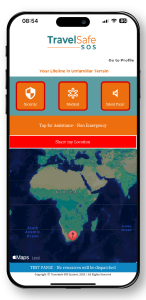
Tapping the SOS button immediately links the user to a Travelsafe SOS operator who can view your pre-loaded profile and share essential details with emergency responders. This allows the operator to quickly communicate accurate, relevant information—such as medical conditions to those providing help. It streamlines emergency response, saving valuable time and reducing confusion on the ground. This function is especially valuable during medical incidents, vehicle accidents, or when the user is unable to speak for themselves.
Note – The app safeguards user privacy by granting operators access to personal details only when an SOS alert is activated. As soon as the emergency is addressed and the case is closed, all personal data is automatically locked and no longer visible to operators, ensuring confidentiality at every stage.
How Digital Storage Helps in Real Travel Situations
Digital backups can prevent major disruptions:
Lost passport abroad
A digital passport copy helps your embassy verify your identity, speeding up replacement.
Border checks
Many African borders require proof of visa or onward travel. Offline access ensures documents are always available.
Electronic travel authorizations
Countries using eTAs expect travellers to present digital proof. Stored copies prevent delays when email access is unavailable.
Medical emergencies
Hospitals may require ID, insurance details, and medical notes. Quick access improves care and reduces risks.
Hotel or airline check-ins
Accessing your ID or booking reference instantly keeps verification quick and stress-free.
Remote travel
Safari areas, islands, and rural airports often have no internet. Offline document access is critical.
Offline Access: A Must-Have for Africa Travel
Reliable signal is not guaranteed in many parts of Africa. Digital document storage only becomes truly useful when accessible offline. This matters for:
• Remote lodges
• Game reserves
• Border posts
• Rural airports
• Coastlines and islands
• Long overland routes
TravelSafe SOS is built specifically for African travel conditions, making its offline document vault especially useful during cross-border travel or safari itineraries.
Security, Encryption, and Privacy
Modern travel safety apps use encryption and secure transmission to protect sensitive information. Travelers should ensure that their chosen app offers:
• Encrypted storage
• SSL or TLS data transmission
• Privacy controls
• No passive data tracking
• No third-party data sharing
• Fast document lockout after emergencies
TravelSafe SOS uses encrypted storage and restricted emergency-only access, ensuring that personal data remains protected at all times.
How to Upload Travel Documents Securely
Uploading is simple:
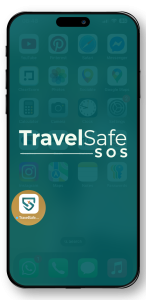
Open your TravelSafe SOS app
Navigate to the document storage or vault section
Add files as PDFs or images
Label them clearly for easy retrieval
Confirm secure encrypted storage
This ensures your documents are always accessible, even with no internet connection. Travelsafe SOS understands that signal isn’t always guaranteed in rural lodges, game parks, or along long transfer routes. That’s why your stored documents are accessible offline—so they’re always there when you need them most.
You don’t need data to view or share your files with border agents, medical staff, or travel providers. Just open the app and go. Even in remote areas with no signal or Wi-Fi, your essential documents remain accessible—making TravelSafe SOS the smart backup plan for secure, stress-free travel.
Why Digital Storage Will Be Essential for 2026 Travel
Several global trends are driving increased demand for digital backups:
• Rapid move toward eVisas and eTAs
• More digital identity screening at airports
• Increase in lost passport incidents
• Growth in mobile-first travel
• Multi-country African itineraries becoming more popular
• Rising use of travel safety apps in emergency planning
As travellers increasingly search for the best app for travel safety in Africa, digital document storage will remain a top priority for 2026 and beyond.
TravelSafe SOS continues to evolve its document vault to meet these requirements, offering travellers an Africa-ready safety solution that supports both convenience and emergency readiness.
Final Thoughts
Digital travel document storage is an essential part of modern travel preparation. Whether you misplace your passport, face a border inspection, or need ID during a medical emergency, having secure digital backups ensures your trip continues smoothly.
TravelSafe SOS provides encrypted digital storage, offline access, and integrated emergency response—making digital travel document storage Africa essential for safe, confident travel
Download the TravelSafe SOS (Android) or TravelSafe SOS (iPhone) with peace of mind for your secure travel to Africa.